

Evoto has just landed in your retouching workflow with a bold promise: cut your post‑production time by a factor of five while keeping a natural, professional look. After a portrait duo shoot with Evelyne Dumont, a photographer from my city, here’s our unfiltered feedback – real productivity gains, but also the limitations you need to know before investing.
In a nutshell
- Massive time savings: up to 80% less time spent editing thanks to AI batch processing.
- Ultra‑natural skin retouching: texture preserved, ideal for portrait, maternity and family shoots.
- Credit‑based model: you pay on export, no classic monthly subscription.
- Cloud collaboration: multi‑device sync and team workflow.
- Key limitations: less granular creative control than Photoshop, variable cost depending on your volume.
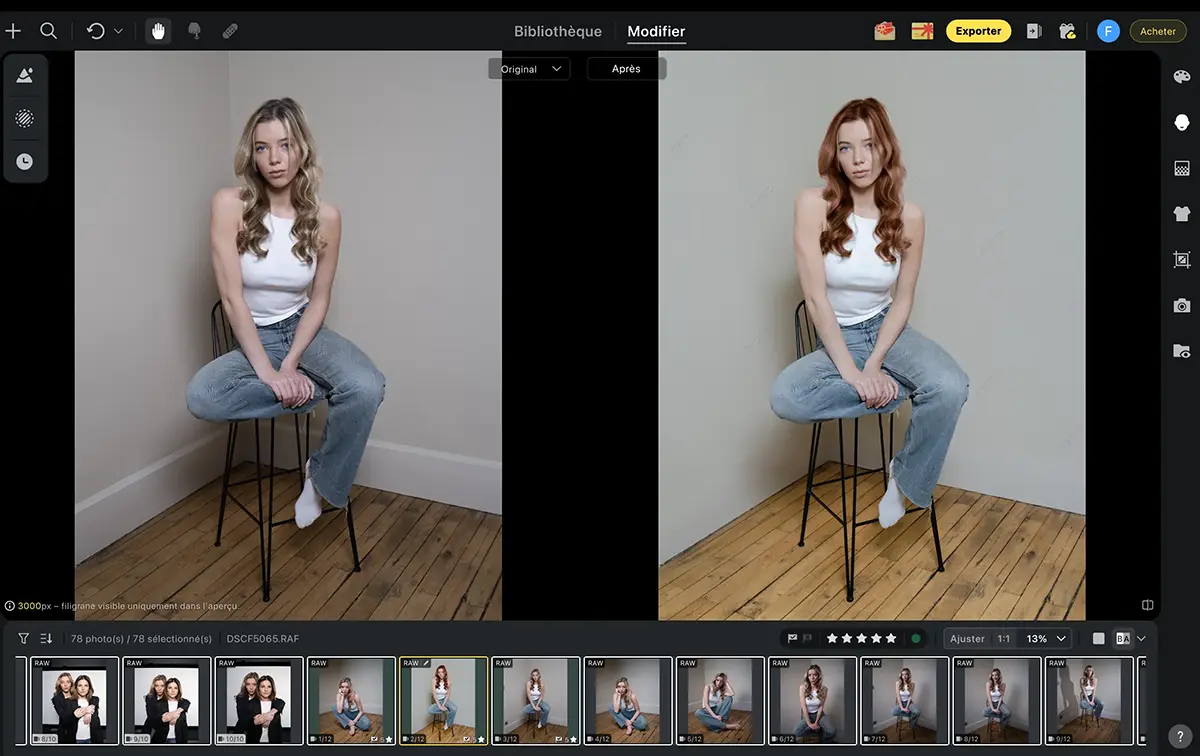
Evoto lets you retouch both the subject and the background in just a few clicks. Everything can be fine‑tuned with numerous sliders that target the whole body and the background, so you can let Evoto do the heavy lifting and then take over manually if you need more precise work.
Exclusive Virusphoto offer
15 free credits on your first Evoto plan + 20% off credit packs and 15% off the subscription with our promo code VIRUSPHOTO.
Try Evoto for free and grab the offer
Valid on all annual subscriptions. The free credits are added automatically to your account.
What is Evoto, and who is it for?
Evoto is an AI‑powered photo editing app designed specifically for portrait, wedding, studio and event photographers who process large volumes of images. Unlike Adobe Lightroom ©, which focuses on versatility, Evoto is all‑in on portrait retouching, with ultra‑specialised AI tools for skin, eyes, hair, facial expression, clothing and backgrounds.
The software uses a credit‑based model: you download the app for free, import and edit as many images as you like, but you only pay when you export your final photos. Each export burns 1 credit, so your costs stay proportional to your real workload.
Version 6.0, released in 2025, added major collaborative features like Cloud Spaces (shared cloud workspaces), wireless tethering (direct camera connection) and AI Culling (automatic photo selection).
Features that genuinely change the game
Collaboration in the Cloud Space
Evoto now includes a Cloud Space system that completely changes team workflows. You can create your personal space (My Space) to sync projects between your Mac, PC and soon iPad, or spin up a Team Space to collaborate with assistants or second shooters.
All adjustments, presets, tags and metadata are synced in real time. In practice, you can edit a photo on your studio computer while your assistant continues culling on their iPad, with everything kept perfectly in sync in the cloud. The Smart Preview tech automatically generates 4K previews under 2 MB for super‑fast loading without eating into your storage quota.
Evoto Instant: from capture to Cloud
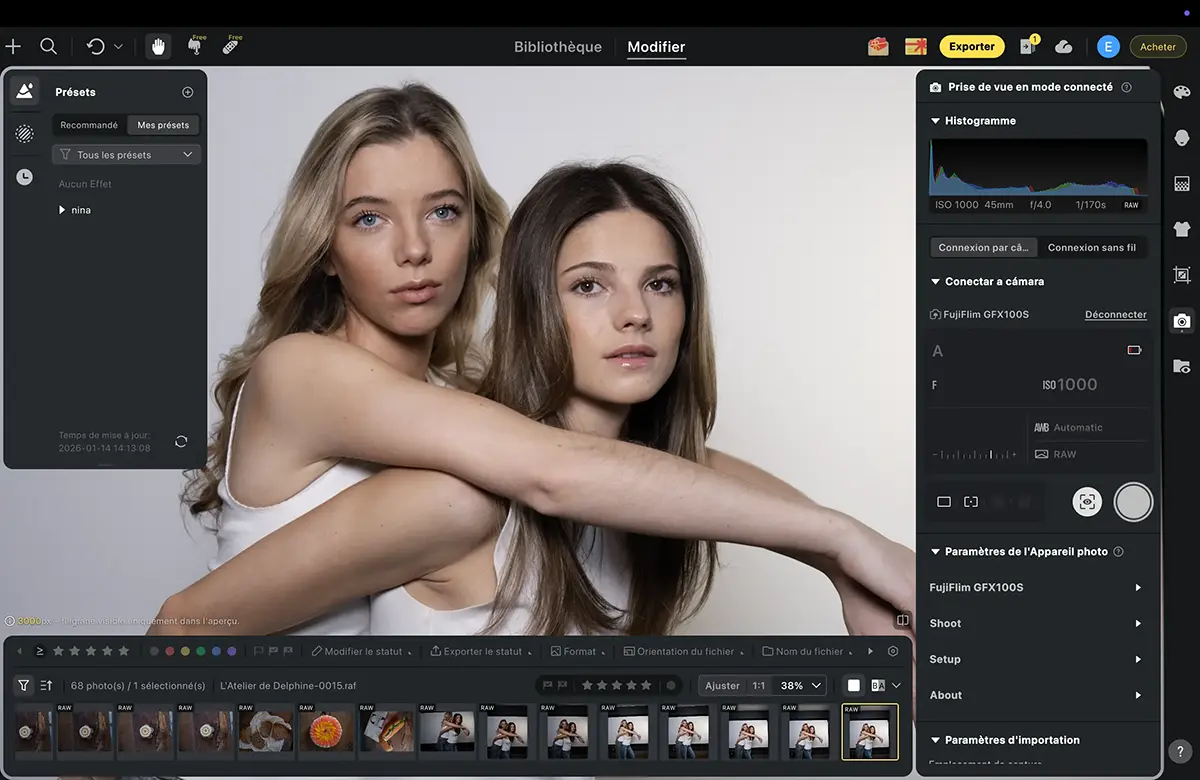
Evoto Instant turns your smartphone into a control station connected to your camera. Shots are sent straight to the Cloud and become instantly available for culling and retouching. The tethering mode (wired or wireless) supports more than 1,000 camera models from Canon, Sony, Nikon, Fujifilm, Leica and Panasonic.
You can even display a live view and use a second screen to show images to your client during the session. Camera settings are pulled directly into the software, and AI Culling analyses and tags each uploaded photo using simple criteria.
Concrete example: you’re shooting a wedding, your iPhone is connected to your camera, every frame is sent to Evoto and auto‑retouched on the fly with a preset you’ve chosen. Pretty wild, right?
I haven’t fully tested this feature yet, because I think it deserves a proper field test on a real‑world assignment to see what it can really do, so I’ll report back soon about Evoto Instant.
Smart Culling: intelligent sorting that saves hours
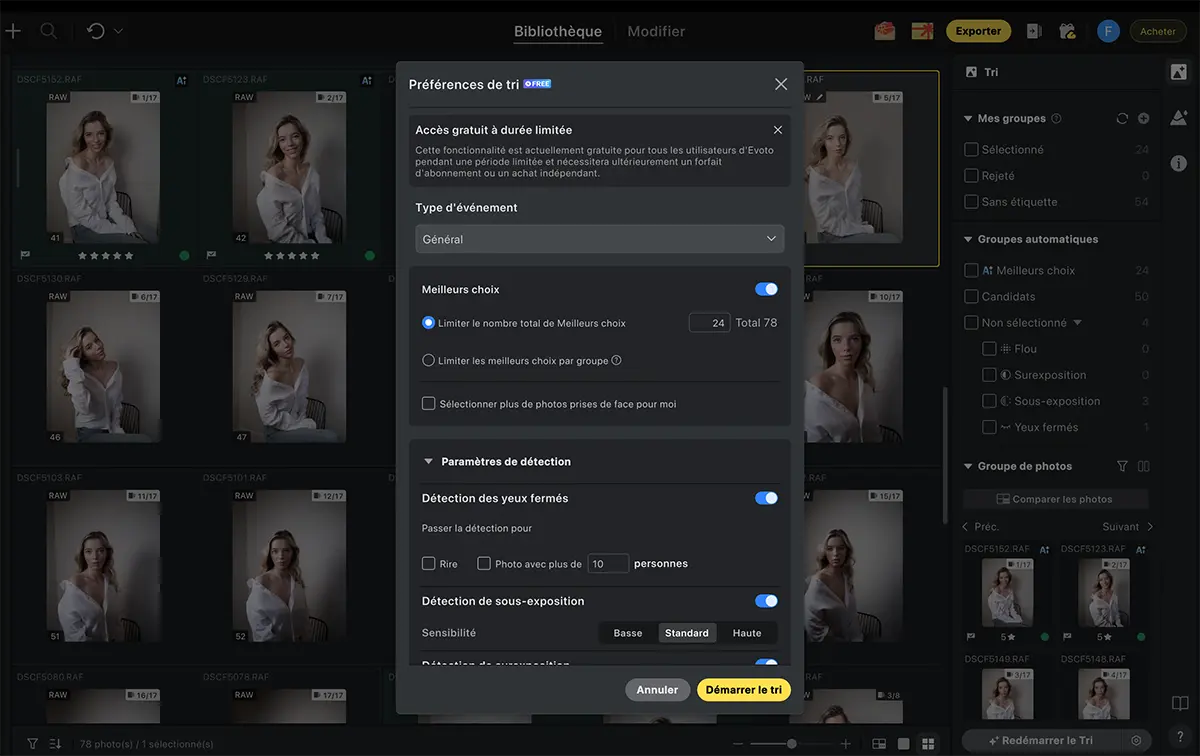
Smart Culling uses AI to sort your photos by sharpness, exposure and subject expression. No more spending hours on a first pass through 2,000 wedding photos – the AI pre‑selects the best shots and you then refine the selection.
The cull runs very quickly, and the many filters for fine‑tuning your final selection are extremely precise. Closed eyes are correctly detected, as are expressions like smiles and soft focus frames, and you can refine by pose groups, solos and duos. The system also considers different framings, even when the pose is identical but tighter or looser.
If you want to try these tools on your own images, you can grab 15 free credits + 20% off credit packs and 15% off the subscription with the VIRUSPHOTO code to test the cloud workflow, wireless tethering and Smart Culling on upcoming shoots.
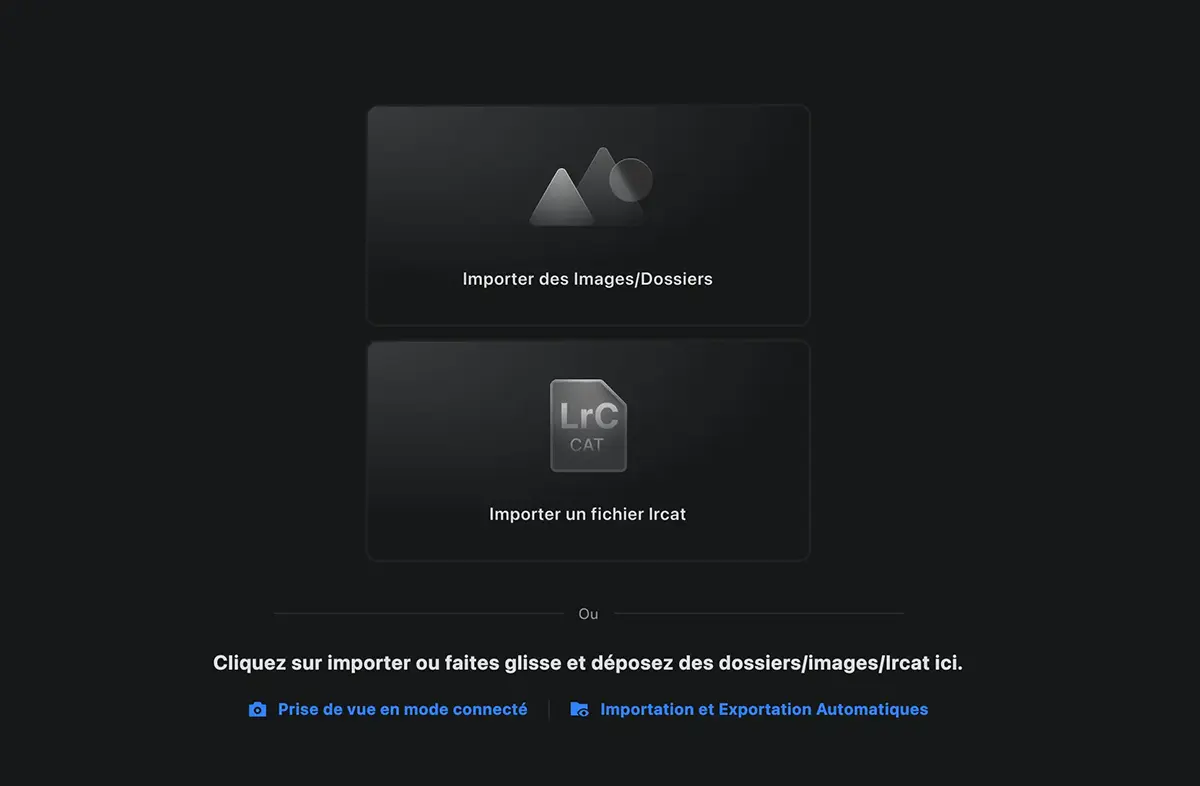
Evoto can import your images from a folder or straight from a Lightroom catalogue. Once that’s done, just create a project, name it and ask Evoto to sort your photos.
A dedicated tool lets you fine‑tune the detection rules you want to use – duplicates, closed eyes, soft images and so on – which is a substantial time‑saver given the number of files we rack up when shooting high‑speed bursts.
Portrait retouching: where Evoto really shines
Colour consistency and white balance
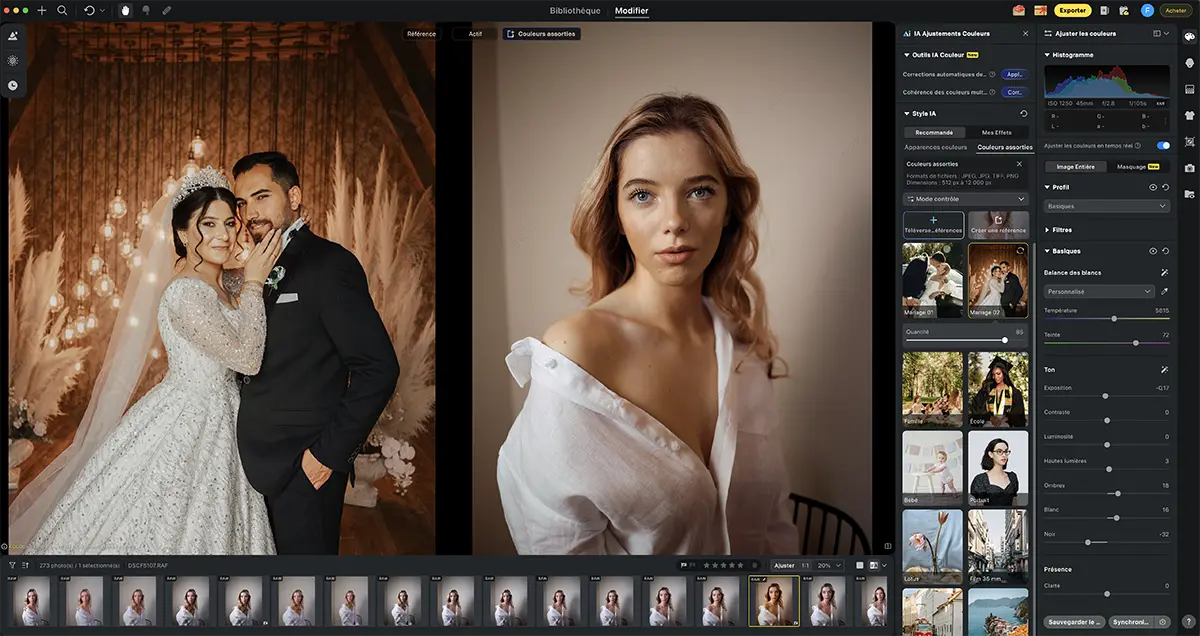
The AI colour matching tool is a gem for harmonising an entire series. You pick a reference image with the mood you want, and the algorithm applies that palette to all your photos – skin tones, shadows, highlights included.
The result: no more random white balance shifts between two shots from the same sequence, or colour casts that break the flow of a wedding album. On a 200‑image reportage, the time saved compared to fiddling with curves and LUTs in Lightroom is huge.
You can also use a reference image with a look you love, even if it’s inspired by another photographer, and it works really well. That said, I wouldn’t recommend straight‑up copying someone else’s style – take the time to craft your own.
Skin retouching: natural, no plastic effect
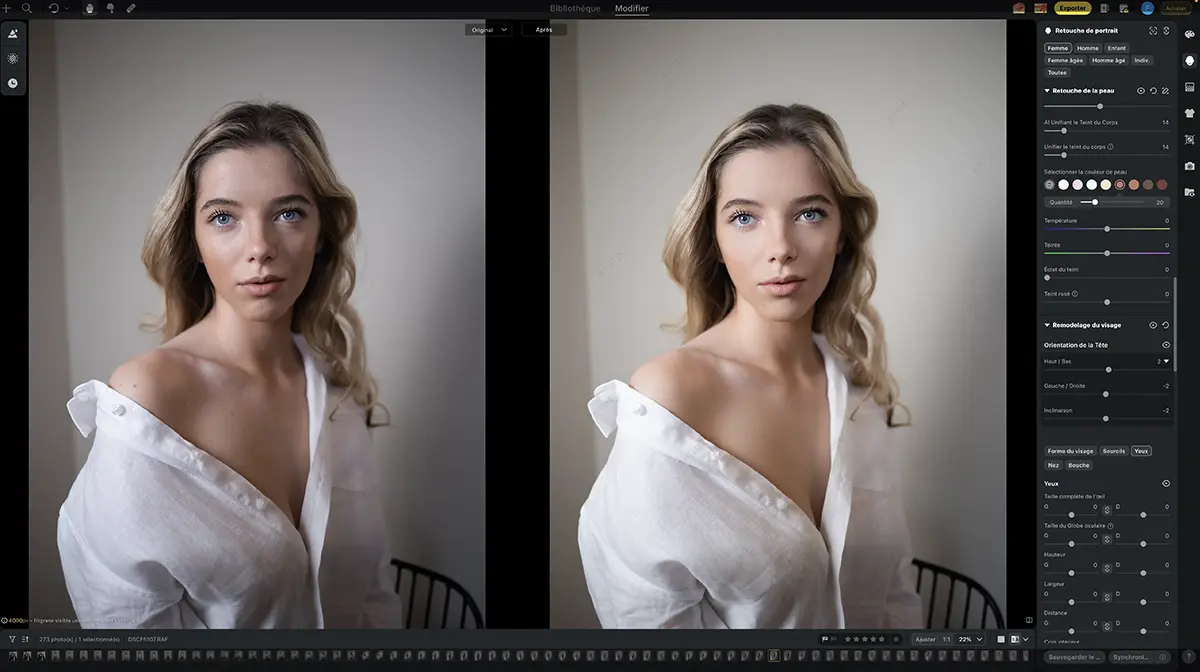
Skin work is Evoto’s standout strength. The AI automatically detects spots, redness, shine, scars and other imperfections in a single click. Unlike some tools that simply blur everything, Evoto preserves the natural skin texture.
You get smart sliders to control intensity: reducing without wiping everything out, keeping a few realistic imperfections that belong in an authentic portrait. For high‑end maternity, newborn and family photography, this soft, luminous look without the plastic‑skin vibe is spot‑on.
On top of that, you can use masks, which I’ll get into in a moment.
Evoto also lets you use a reference image to drive the colour grading of your photos. The software ships with a few built‑in looks, but you can download others or use your own edited images as references, then apply that “preset” to an entire series or even a catalogue with one click.
Denoising and PNG export
The built‑in denoising works very well on RAW files, especially for low‑light sessions. PNG export is particularly handy when you need transparent backgrounds for social media visuals.
Subject cut‑outs are impressively clean, with a lot of precision around the hair. A few tiny details occasionally slip through, but it’s rare enough not to be a deal‑breaker.
Given that every photographer is now active on social platforms, having a tool that not only cuts out your subject with incredible precision, but also outputs a transparent PNG is genuinely useful. You can then drop that file into Canva to build your posts.
Local masks and selective edits
Local masks let you target specific zones to retouch or protect. For example, you can soften skin only on the face while leaving hair and clothing untouched, or adjust exposure in the background without affecting the subject.
Masks also allow you to preserve important details you want to keep visible – scars, tattoos, beauty marks and so on – and they behave in a very similar way to Adobe Lightroom ©’s masking tools. The options for tweaking skin tone, removing blemishes or taming flyaway hair are so numerous that you’ll probably lose a bit of time just exploring them, but they genuinely let you refine your edits almost endlessly without destroying your original image.
Facial expression, eyes and hair
Evoto offers dedicated tools for facial expression adjustments – enhancing a smile or slightly changing the orientation of the face. You also get tools for eyes (brightening, sharpening the gaze) and for flyaway hairs (smoothing stray strands), which are particularly handy when polishing corporate or wedding portraits.
Personally, I’ve never been a fan of “changing” someone’s face, but Evoto doesn’t overdo it and these options can save a shot you love where the smile is missing or the expression is a bit flat. I’ll let you decide how far to push these features.
Limitations and areas for improvement
Interface: a few things to fix
I noticed that when you go back to the main retouching panel, changes made in other tabs are no longer visible. If you’ve modified the background, for instance, you have to return to the “background retouching” tab to see the full result.
It’s a bit frustrating when you want to tweak your global adjustments while seeing the corrected background. I suppose the idea is to move from one tab to another then export, but the reflex to return to global edits after changing the background is strong.
The facial expression feature allows for small tweaks that can genuinely save some images, but the smile tool often outputs the same expression. On a duo, both people can end up with an identical smile, and even though there are settings to refine it, the result still feels a bit “fake”.
Camera connection and embedded settings
The Tethering function is very solid. Connecting our FUJIFILM GFX100 usually requires patience and often causes lag in LR, but here the photos appear “almost” instantly on the iPad Pro – quite a feat when each image weighs in at around 100 MB.
This is brilliant when you’re working as a two‑person team on jobs where files need to be delivered the same day, or when you’re adjusting lighting, make‑up or posing. It’s just easier to judge everything on a big screen.
Evoto lets you capture and preview your shots live via tethering, with support for many camera brands. You can even tweak certain shooting parameters from the software side and trigger the shutter from your computer or tablet screen.
Evoto vs Lightroom: head‑to‑head
| Criteria | Evoto | Lightroom |
|---|---|---|
| Skin retouching (portrait) | Excellent, ultra‑natural AI, very fast.Test-terrain-complet-du-logiciel-de-retouche-Evoto-Avis-croises.pdf | Good, but often needs manual work or a Photoshop combo.Test-terrain-complet-du-logiciel-de-retouche-Evoto-Avis-croises.pdf |
| Batch processing | Exceptional, synced presets and AI batch.Test-terrain-complet-du-logiciel-de-retouche-Evoto-Avis-croises.pdf | Good, but more manual for advanced portrait work.Test-terrain-complet-du-logiciel-de-retouche-Evoto-Avis-croises.pdf |
| Creative colour control | Decent, less granular than LR.Test-terrain-complet-du-logiciel-de-retouche-Evoto-Avis-croises.pdf | Excellent, with very fine curves and masks.Test-terrain-complet-du-logiciel-de-retouche-Evoto-Avis-croises.pdf |
| Organisation / catalogue | Basic, project‑oriented, better for one‑off jobs.Test-terrain-complet-du-logiciel-de-retouche-Evoto-Avis-croises.pdf | Excellent advanced cataloguing and search tools.Test-terrain-complet-du-logiciel-de-retouche-Evoto-Avis-croises.pdf |
| Pricing model | Export credits, about 80 €/year for 800 credits.Test-terrain-complet-du-logiciel-de-retouche-Evoto-Avis-croises.pdf | Fixed subscription ±12 €/month (LR + Ps + 1 TB cloud).Test-terrain-complet-du-logiciel-de-retouche-Evoto-Avis-croises.pdf |
| Portrait retouching speed | 2–5× faster thanks to AI, tested on iPad Pro, MacBook Air M4, iMac M1.Test-terrain-complet-du-logiciel-de-retouche-Evoto-Avis-croises.pdf | Standard, depends on your manual skills, file size and computer power.Test-terrain-complet-du-logiciel-de-retouche-Evoto-Avis-croises.pdf |
| Tethering & studio workflow | Excellent, wireless and multi‑device, can be slower with huge files.Test-terrain-complet-du-logiciel-de-retouche-Evoto-Avis-croises.pdf | Good, mainly wired.Test-terrain-complet-du-logiciel-de-retouche-Evoto-Avis-croises.pdf |
| Mobile / web ecosystem | iPad app and evolving cloud features.Test-terrain-complet-du-logiciel-de-retouche-Evoto-Avis-croises.pdf | Very mature, with full‑featured mobile apps.Test-terrain-complet-du-logiciel-de-retouche-Evoto-Avis-croises.pdf |
My real‑world verdict: Evoto is a beast for high‑volume portrait work (weddings, family sessions, corporate) and saves a ridiculous amount of time. Lightroom still wins for managing huge catalogues, ultra‑fine creative colour control and its complete multi‑platform ecosystem.
If you’re used to Lightroom, take the time to run them side by side. For me, the sweet spot right now is LR for catalogue management and Evoto for fast, live, batch retouching.
Ready to try it yourself? You don’t even need a bank card to start: 15 free credits to retouch your first portraits + 20% off credit packs and 15% off the subscription with the VIRUSPHOTO code.
Download Evoto for free and activate the offer keep Lightroom for your catalogue and add Evoto for AI‑driven portrait retouching.
Split verdict: Frederic vs Evelyne – two photographers put Evoto to the test
To keep things balanced, I compared my opinion with that of Evelyne Dumont, a portrait and food photographer based in Vichy, who I joined on a client shoot. Here’s how our conversation went.
On time savings
Frédéric: “For me, Evoto literally cut my retouching time by three on studio portrait and product sessions. With synced presets and AI batch, I can process a hundred photos in a few minutes instead of several hours in Lightroom – it’s a game changer for my profitability.”
Evelyne: “I agree on the time savings for pure volume. But it’s still essential to go through each image to check the AI hasn’t missed a detail – a badly detected skin area, a reflection that wasn’t removed properly. So yes, it’s (very) fast, but not 100% automatic.”
On skin retouch quality
Frédéric: “The skin retouching is stunning. Texture remains, redness is toned down without that plastic sheen. For my high‑end maternity and newborn shoots, it’s exactly the natural, luminous look I was chasing.”
Evelyne: “I agree the result looks natural, but sometimes the AI pushes a bit too hard and I have to pull the sliders back to keep some character. On very marked faces or mature skin, you really have to fine‑tune things to avoid going too smooth.”
On series consistency
Frédéric: “The colour matching tool is killer. I can apply the same colour mood to 200 photos in two clicks, no more white balance drift between frames. My series finally look properly consistent.”
Evelyne: “Yes, but you first need to create presets that genuinely match your own style, and that takes time up front. Once set up, it’s super‑effective, but the learning curve isn’t zero.”
On the credit‑based pricing model
Frédéric: “Because I charge properly for my sessions and value the time saved, the credit system works for me. I pay only for what I export, no waste, and when you gain time you can fit in more shoots each month.”
Evelyne: “I’m more cautious. For my big weddings with 1,500 delivered photos, the credit bill can quickly overtake my fixed Lightroom plan. Watching the credit counter tick down is stressful – for low‑budget work or very high volumes, it’s economically risky.”
On creative control
Frédéric: “For 90% of my edits, Evoto is more than enough. The control is precise enough for most of what I need, especially when the image is already strong straight out of camera.”
Evelyne: “As soon as I want a very specific colour style, compositing, or complex multi‑layer edits, I go straight back to Lightroom + Photoshop. Evoto is brilliant as a fast base, but it doesn’t replace everything.”
On workflow integration
Frédéric: “I use Evoto as a complement to Lightroom. I do my cull and base adjustments in LR, then send files to Evoto for AI portrait retouching. For travel or product photography I’ll stick with LR for now, it’s still better suited.”
Evelyne: “Same here – it’s an excellent add‑on, not a full replacement. For now, Evoto doesn’t have Lightroom’s catalogue, geotagging, print or long‑term archive tools; it’s a specialised tool that’s extremely good at its job.”
Virtual copies and non‑destructive workflow
Just like Lightroom, Evoto is fully non‑destructive – your original RAW files are never touched. You can create virtual copies to test multiple looks on the same image, compare results and roll back at any time.
The cloud project versioning system lets you restore or switch between different retouch versions, which is very handy when presenting several options to a client or tracking your creative evolution over time. I’ll admit I haven’t completely wrapped my head around how it all ties together yet, and I still get lost in the tabs and what’s being shown – it’s not always intuitive.
Pricing: credits, subscriptions and traps to avoid
How credits work
Evoto offers two payment models:
- Pay‑as‑you‑go: you buy credits when you need them, valid for up to two years but non‑rollover.
- Annual subscription: you get a yearly credit allowance (e.g. 800 credits for about 80 €/year), and unused credits roll over into the next year up to 5× your annual allowance.
Each export costs 1 credit per photo (around 0.10 € per exported image), and Evoto gives you 15 free credits to test the service. Good to know: a photo you’ve already exported can be re‑edited and re‑exported later without any extra credit charge.
Annual plan vs pay‑as‑you‑go
If you shoot portraits regularly (weddings, sessions, events), the annual plan works out much cheaper. Credits roll over year on year as long as you renew, and you can buy extra credit “top‑up packs” at the same per‑image price as your subscription.
Watch out, though: if you cancel your annual plan and don’t renew within the 30‑day grace period, all remaining credits are lost. There’s no carry‑over if you sign up again later.
Which Evoto plan for your volume?
- Occasional photographer (< 50 portraits/month): pay‑as‑you‑go or a small Starter plan (800 credits/year).
- Regular portrait shooter (100–300 portraits/month): Basic or Basic Plus plan (1,600–3,600 credits/year).
- Wedding / event studio (> 500 portraits/month): Standard subscription or a custom enterprise plan.
FAQ
Can Evoto fully replace Lightroom and Photoshop?
No – Evoto is a specialised portrait retouching tool, not a complete replacement. It excels at skin, eyes, hair and batch processing, but Lightroom is still better for huge catalogue management, keywording, geotagging and ultra‑fine colour tweaks. Photoshop remains the king for compositing, complex multi‑layer work and creative montages.
How much does Evoto cost compared to Lightroom?
Adobe Lightroom + Photoshop is roughly 12 €/month (144 €/year) with 1 TB of cloud storage. Evoto charges per export: a Starter plan with 800 credits/year is about 80 €/year (0.10 €/exported image). If you export fewer than 800 photos per year, Evoto is cheaper; beyond roughly 1,200–1,500 photos/year, the Adobe model starts to look more competitive.
Does Evoto support RAW files from all cameras?
Yes – Evoto supports RAW files from over 1,000 camera models, including Canon, Sony, Nikon, Fujifilm, Leica and Panasonic. It works non‑destructively and preserves all RAW detail for high‑fidelity results.
Do Evoto credits expire?
It depends on your plan. Pay‑as‑you‑go credits expire after two years and cannot be rolled over, while credits from an annual subscription automatically roll over each year (up to 5× your current plan’s allowance) as long as you renew. If you cancel and don’t renew within 30 days, all remaining credits are lost.
Can I use Evoto on several computers?
Yes – with Cloud Space you can sync projects across multiple devices (Mac, PC and soon iPad). On pay‑as‑you‑go you can connect up to two devices, while an annual subscription increases that limit depending on your plan. Enterprise plans allow you to share a Team Space across several users.
Conclusion
The big names in photo retouching still have a head start, but they’re no longer immune to photographers switching over to nimble AI‑powered tools with much sharper workflows. Evoto is still relatively new, yet it already attracts thousands of users worldwide, and its pace of new features – plus how closely the team listens to feedback – suggests it could soon become an essential professional retouching tool.
Try Evoto for free with the Virusphoto offer
If you’re still reading, it’s safe to say you’re genuinely interested. Rather than relying solely on my experience, test Evoto on your own photos and make up your own mind.
Exclusive offer for Virusphoto readers:
- 15 free credits to retouch your first portraits (worth about 15 €)
- 20% off credit packs
- 15% off the subscription
Promo code: VIRUSPHOTO – no bank card needed to start.
I’m testing Evoto for free
One thing’s guaranteed within 48 hours: if you don’t like it, you don’t export anything and you don’t pay a penny. Simple and transparent.